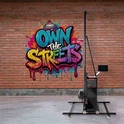
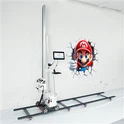
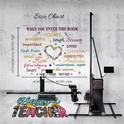
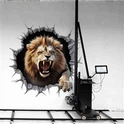
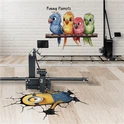
Wall and floor printing has moved from being a futuristic gimmick to becoming one of the smartest, most efficient ways to handle decoration, branding, and advertising projects. In the past, businesses relied on painters, stickers, or banners-expensive processes that took lots of time and usually limited creativity. But today, with a wide range of wall and floor printers available, you can turn a vision into a finished mural or floor graphic in hours, not weeks.
The market in 2025 is heating up, with global brands competing alongside specialized manufacturers. Whether you're an interior designer, an event company, or a contractor, the key question is: which machine is right for you? This article will walk you through the essentials, compare top contenders, and show why Tanyu's flexible, user-friendly design with outstanding cost-performance has become a favorite with businesses that value both quality and practicality.
If you've been researching wall and floor printers, you've probably run into three problems:
- Too many buzzwords (UV, 2 in 1, all in one, grayscale, "industrial").
- Specs that don't match the real-world job site.
- Pricing and service info that's hard to compare.
This guide keeps it grounded. We'll cover what actually matters in 2025, who the leading contenders are, and how to choose-without overthinking it. And if you're switching between walls and floors on the same day, we'll show you why a well-designed 2 in 1 like TANYU delivers standout value and speed.
What is wall and floor printer?
- A vertical inkjet printer that traverses along rails to print murals directly on walls (painted drywall, brick, tile, glass with primer, etc.).
- A horizontal UV inkjet printer that prints directly onto floors (epoxy, polished concrete, tile, vinyl) or onto panels you install later.
- One rig that converts between vertical and horizontal modes, so you can print both walls and floors onsite.
Quick picks by use case
- Indoor murals on painted walls: UV wall printer (CMYK + White) for vibrant color and better adhesion; add a clear coat in high-traffic areas.
- Dark or textured walls (brick, tile): UV wall printer with white ink and anti-collision/height sensors.
- Budget, low-odor indoor spaces: Aqueous/water-based wall printer (smooth, light-colored walls only), then topcoat.
- Heavy-duty floor graphics: UV floor printer + matte/anti-slip varnish; or print durable panels on a UV flatbed and install.
- Mixed jobs (walls + floors) onsite: A high-quality wall and floor printer saves time, vehicle space, and labor vs. bringing two machines.
Why Wall & Floor Printers Matter in 2025
Murals that Actually Pay Off
Customers today expect personalization. Whether it's an office lobby, a living room, or a trade show stand, they want artwork that sets their space apart. Wall printers let you create custom full-wall graphics with photographic precision, while floor printers can lay down logos, patterns, or even interactive designs that turn heads and pull audiences in.
Time Is Money
Traditional murals might take weeks. Pre-cut stickers often need careful installation and don't always last. With UV-based printing systems, you can set up and finish a massive project in a single day. That speed not only reduces labor cost but also lets businesses take on more jobs per month.
Durability and Professionalism
UV inks used in most modern machines are tough-resistant to fading, scratching, even heavy foot traffic when applied to the right surface. That means you're not just offering "pretty pictures," you're delivering value that lasts.
What to Look for in a Wall or Floor Printer
Instead of drowning in technical numbers, think in terms of business value. Don't get trapped by marketing numbers-evaluate based on job outcomes. Here are the five major factors that separate a good purchase from an expensive regret:
1. Ink type
- UV-LED: Cures instantly, prints on most surfaces, withstands abrasion better, and supports white + varnish. Needs ventilation and UV safety.
- Water-based (aqueous): Low odor/cost; best on smooth, sealed, light-colored walls; not great on dark/porous surfaces without primer and careful profiling.
- UV inks dominate 2025. They dry instantly under UV light, they're durable indoors and outdoors, and many manufacturers now offer eco-friendly formulations-good for both the client's conscience and your reputation.
2. Printheads and channels
- Common heads: Epson DX7, i1600-U1, i3200-U1; Ricoh G5/G6.
- Channels: CMYK is baseline; White for dark walls/floors; Varnish for matte/gloss and added scuff resistance.
- Grayscale and droplet size: 6–12 pl droplets plus grayscale control improve gradients and reduce grain.
- Resolution isn't just for photographers. Clients want crisp images, fine details, and vibrant colors. Any serious printer should deliver at least 1440 dpi to meet modern expectations.
3. Surface tolerance and safety
Look for laser/ultrasonic height sensing and anti-collision to protect heads and maintain quality on uneven brick, stucco, or slightly warped floors.
Can the machine handle both smooth plaster and slightly rough walls? Can it deal with flooring that isn't perfectly polished? This versatility expands the kinds of jobs you can take on.
4. Speed (real-world)
Expect 2–6 m²/h for wall and floor printer in "sellable" quality modes. Ask vendors to show the exact mode and passes.
If your clients are homeowners wanting a mural for their kids' bedroom, speed isn't critical. If you're running commercial projects like malls or exhibitions, though, faster printing equals more money earned daily.
5. Practical Handling
Machines That Are Designed With User Comfort In Mind Always Pay Off. Things Like Fast Setup, Modular Parts, And Easy Adjustments Can Save Hours Per Project And Reduce Operator Stress.
What's new in 2025
- Smarter surface mapping: More models ship with laser/ultrasonic height sensing to stabilize prints on uneven walls.
- Better white ink reliability: Recirculating white channels reduce clogs and banding on dark substrates.
- Remote support: Vendors can log in to help calibrate or diagnose issues faster.
- Eco progress: Low-migration UV inks and friendlier cleaning fluids are gaining traction.
2025 top contenders (visual comparison)
Based on the brands and product pages you shared. Specs vary by configuration-confirm ink sets, print modes, speed, and support in your region.
| Brand | Strengths | Best Use Case |
|---|---|---|
| Dxonjet | Rugged floor-only UV build; CMYK+White; optimized for concrete/epoxy/tile; supports protective clear coats | Dedicated floor graphics in retail/venues needing long wear and anti-slip finishes |
| TWP | UV CMYK+White; turnkey package with coatings; strong training and support in North America | US/Canada shops wanting a supported, ready-to-run floor printer |
|
Perfect Laser |
Budget-friendly entry; global shipping; common CMYK+White options | Startups piloting indoor floor murals or light-duty installs |
| HJZ Laser |
|
|
| Ant‑Print | Value‑focused wall‑only UV; works on painted walls, brick, tile, glass (with primer); White ink variants | Mural work for offices, hospitality, retail on varied wall surfaces |
| Tudox | EU‑focused; CE compliance; robust mechanics; in‑region service; White ink options | European mural providers prioritizing compliance and local warranty/training |
Before you buy: common drawbacks
Quick reality check from the field. A lot of "hybrid" solutions on the market look good on paper, but they carry trade‑offs that slow jobs, inflate labor, and eat margins-especially when you switch between walls and floors onsite.
1. Few true wall–floor all‑in‑ones
- What happens: Many "hybrids" are really wall printers with bolt‑on floor kits. Others are two separate devices sold as a bundle.
- Why it matters: More parts to carry, more training variables, and more things to misplace or misassemble under time pressure.
2. Floor printers usually cost 15–20% more than wall printers
- What happens: Floor units need tougher frames, higher load rails, and abrasion‑resistant design to handle rolling and foot‑traffic use.
- Why it matters: Your capital outlay rises, yet your utilization might be split between walls and floors-so the ROI window stretches if you can't maximize both.
3. Floor printing demands a very flat substrate (prep cost ≈ 40% of total)
- What happens: Floors often need grinding/leveling before printing; dust control and masking add time; topcoats are mandatory in public spaces.
- Why it matters: Site prep can consume 40% (or more) of project cost and schedule. If your machine is slow to set up or switch modes, you lose even more of the day.
4. Curved/stepped surfaces are usually a no‑go
- What happens: Most current rigs can't print on slopes, ramps, or stairs. The head clearance and planar motion system just aren't designed for it.
- Why it matters: You can't quote those jobs with direct printing; you'll need decals, panels, or hand painting-meaning missed revenue and inconsistent finishes.
5. Mode switching takes 30–50 minutes on many systems
- What happens: Changing from wall to floor often means loosening brackets, moving rails, re‑plugging cables, and re‑calibrating tilt and height.
- Why it matters: That's a half hour of dead time (or more) every time you change modes-killing the day's schedule and shrinking billable output.
6. Complex reassembly = higher risk of damage
- What happens: Frequent disassembly/assembly of brackets, rails, and cables leads to bent connectors, stripped threads, and misaligned frames.
- Why it matters: Tiny alignment errors show up as banding. Minor cable strain becomes intermittent faults. Repairs and delays follow.
7. Manual calibration screws are slow and error‑prone
- What happens: Leveling, skew, and head height are often dialed by hand using screws and bubble levels.
- Why it matters: It takes time, skill, and two sets of eyes. A small mistake can ruin a print or force a re‑do at your cost.
8. Two operators required for safe handling
- What happens: Many rigs need two people to switch modes, lift the mast, reposition rails, and keep cables tidy.
- Why it matters: Labor costs jump. Scheduling gets harder. Small teams can't move quickly between jobs.
9. Ink cartridge flipping risks spills
- What happens: Some designs require literally flipping or repositioning ink supplies when switching orientations.
- Why it matters: Spilled ink is safety‑critical on floors, risks head contamination, adds cleanup time, and wastes consumables.
10. "Conversion by accessories" is clunky
- What happens: To go from wall to floor, you add extra brackets/rails/modules to the base wall printer.
- Why it matters: Accessories wander, bend, or break. More loose parts = more failure points and longer setup each visit.
11. Water‑based ink on floor jobs is a non‑starter for durability
- What happens: Budget hybrids often ship with aqueous inks. They're low‑odor but not made for abrasion and daily foot traffic.
- Why it matters: You'll fight adhesion on many surfaces, deal with smearing if not perfectly sealed, and limit your substrate options. Dark surfaces need a white underbase many water‑based setups don't support well.
Bottom line: These friction points add up
- Time: 30–50 minutes per mode switch + manual calibration can cost you a full job per day.
- Risk: Reassembly, cable stress, and hand tuning raise the odds of banding, head strikes, and failures.
- Cost: Two‑person crews, heavy floor prep, and ink mishandling push margins down.
- Scope: No curved/stepped surfaces means you can't bid certain projects at all.
- The good news: you don't have to accept these trade‑offs. If you pick a hybrid engineered for rapid, tool‑light changeovers, one‑person operation, and robust motion control, you can keep the capital footprint small and the job throughput high.
How to choose (without overthinking it)
This is where most buyers get stuck: too many specs, too much technical jargon. But here's the simple way to think about it: buy the machine that matches the kind of jobs you actually do most.
Now, let's talk about Tanyu-because if you're after maximum bang for your buck, this is the one machine that stands out in 2025.
Fast & Flexible Conversion
Tanyu wall and floor printer machines feature a 5–8 minute wall-to-floor setup switch, thanks to quick-install connections between the print head and slider column. Many competitors need long adjustments, but here it's seamless.
Solo-Friendly Design
Setup doesn't need a crew. With ergonomic engineering and computer-based conversion controls, a single operator can handle debugging before print. That means lower labor needs and higher independence.
Day-to-Day Practicality
- Built-in mouse pad for quick adjustments.
- Integrated handle for fast repositioning.
- Extra frame space for storing small essentials during a job.
These details look small but save a surprising amount of time on real projects.
Reliability on the Job
- Quick-release rails for smoother disassembly.
- Durable slider rail system with high load capacity-print jobs stay steady even with complex designs.
- Servo motors for both vertical and horizontal movement, ensuring smooth speed with pinpoint precision.
Safety & Durability
The aviation plug spring wiring doesn't just look smart: it prevents bending and pulling damage, dramatically reducing cable-related failures-one of the most common headaches in the industry.
Configurable Printing Power
- Standard supports DX7 and i1600 heads.
- Optional upgrade to i3200 or G6 for higher speed and volume production.
Size That Grows With You
- Standard height: 3m, with 6m rail.
- Wall mode extension: up to 3.5m high.
- Floor mode extension: up to 4m long.
That means you won't outgrow your printer when bigger jobs come along.
Why Tanyu is the Sweet Spot Value in 2025
When stacked against other brands, here's the bottom line:
Cheaper options (like Perfect Laser) save on price but compromise convenience and reliability.
Premium Western brands (like The Wall Printer) excel in service but have a hefty price tag.
Specialist machines (like DXONJET) dominate their niche but lack versatility.
Tanyu balances them all:
High-level engineering like the servo motors and quick conversion system, usually found in top-tier brands.
Affordable, flexible configuration that keeps costs down.
Practical operator-friendly usability that makes daily work easier.
For small businesses, agencies, and contractors who want one machine that won't eat their entire budget but will keep pace with projects of all sizes, Tanyu is easily among the strongest cost-performance picks in 2025.
Final Thoughts
The wall and floor printing market is booming, and choosing the right machine can directly impact your profitability. Think about what you really need: walls, floors, or both? Do you care more about premium service, the lowest possible entry price, or a mix of performance and value?
If you want a balanced solution , capable of fast one-person operation, and flexible enough to grow with your business-all at a highly competitive cost.
In 2025, wall and floor printers aren't just machines; they're partners in building your reputation. Invest wisely, and your printer becomes your most reliable employee, churning out masterpieces that keep clients coming back.